One prompt, 11 videos at once
How I make and post our product videos: Claude Opus 5.5, our team memory, CoreSpeed's media tool, Drive, and a MacBook the agent can use.

People keep asking me how we make so many good-looking product videos, and how we post them so fast. Honestly, the answer is Claude Opus 5.5.
Then some of them tell me they use Opus 5.5 too and don't see the magic. Fair. The model is half of it. The other half is what the model can reach. I give it almost a one-shot prompt, and 11 videos get made at the same time, each by its own Opus 5.5 in the cloud. Then they go out to every platform from my own laptop.
Two of them are on our YouTube: On demand and Tie. Here is the whole setup.
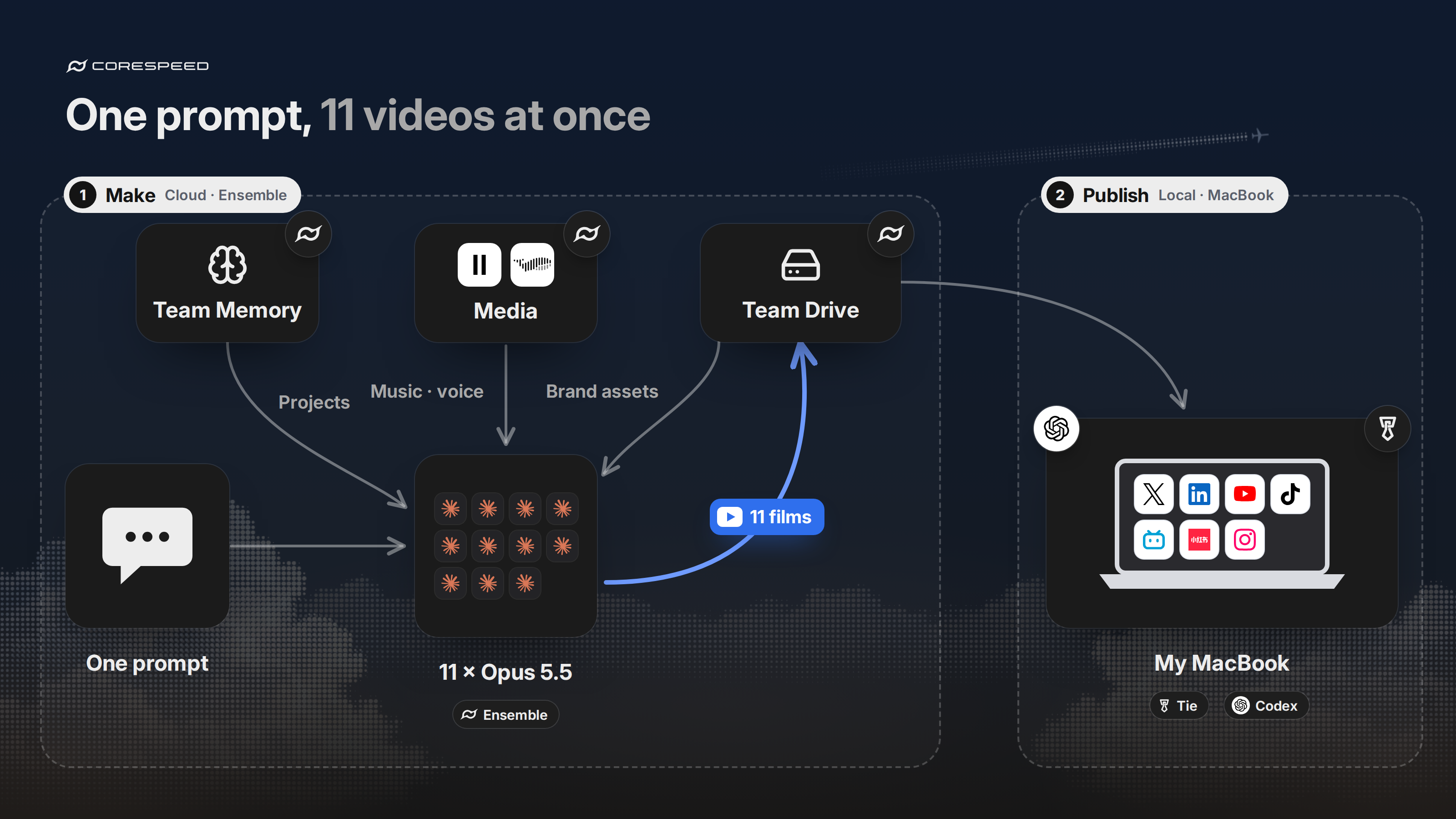
Production runs in the cloud. Publishing runs on my MacBook, where my accounts are signed in.
1. The agent knows the company
This matters most. Our team memory on CoreSpeed holds what we make, how we talk about it, and the rules we learned the hard way. Every session searches it before it plans anything, so I never explain CoreSpeed eleven times.
Two rules from it:
- Every published video gets a chosen cover, fixed as its first frame. I wrote that down once, on October 23. It's pinned, so every session sees it when it starts.
- How to say "CoreSpeed" in a voiceover. One word, stress on "Core". Benji wrote it down after one voice stressed the name strangely, along with what works: ElevenLabs gets it right from IPA, and Fish Audio's Drama 3 gets it right as written. No session has to find that out again.
2. Opus 5.5, with nothing in its way
Use Opus 5.5. Then don't bury it in instructions. Skills that tell it how to edit a video, for Remotion, HyperFrames or CapCut, hold it back.
Give it the brief, the brand and the rules, and let it direct. It writes every scene itself, as code. We still render that code to MP4 with the HyperFrames command line, and the renderer is fine. The playbook is what I keep out.
3. Eleven at once, in the cloud
Every video gets its own Opus 5.5 session, one product feature per film, and all eleven run at the same time. They run on Agent Fleet, our home for agents in the cloud. It's coming soon; inside the company we call it Ensemble. Each session gets its own machine, so eleven renders don't fight over one laptop, and I can open any of them in a browser to watch or step in.
A session can also start other sessions. For our Tools series, I asked one session to split the catalog into categories and start a session for each. That made nine films.
4. Music and voice from the media tool
Every film needs a score, and some need a voiceover. Both come from CoreSpeed's media tool, which includes ElevenLabs and Fish Audio. The agent calls them through the same CoreSpeed connection it already uses. No extra accounts, no extra keys.
The Tie film's score is one ElevenLabs Music job: 64 seconds, written section by section to match the cuts. The agent then transcribed the final mix to make sure no stray vocals had slipped in.
5. Brand assets from Drive
Logos, product screenshots, backgrounds and the series' style rules all live in CoreSpeed Drive. It's basically the agent's Google Drive. Every session reads the same files, which is why eleven films made in parallel still look like one series.
When a film is done, it goes back into Drive with its cover, its source project and its notes.
6. Publishing from my own MacBook
People ask why I don't post from the cloud. My social accounts are signed in on my own laptop. I scroll X, LinkedIn and Xiaohongshu myself, so that browser is already logged in everywhere.
So the cloud session writes a handoff into Drive: which video goes to which platform, the exact text, a checksum for every file, and what counts as proof that a post is live. Then one of two things happens:
- If I'm at my desk, I tell Codex on my MacBook to read the handoff and post.
- If I'm not, Claude in the cloud reaches my MacBook through CoreSpeed Tie and has Codex do the same.
A post only counts with a URL, and Codex writes each one back into Drive. On October 26 the Tie film went out this way to YouTube, X, TikTok, LinkedIn, Bilibili and Xiaohongshu.
Try it
Memory, the media tool, Drive and Tie all work today. Paste one line into your agent:
set up https://corespeed.io/SKILL.mdAnd use Opus 5.5.